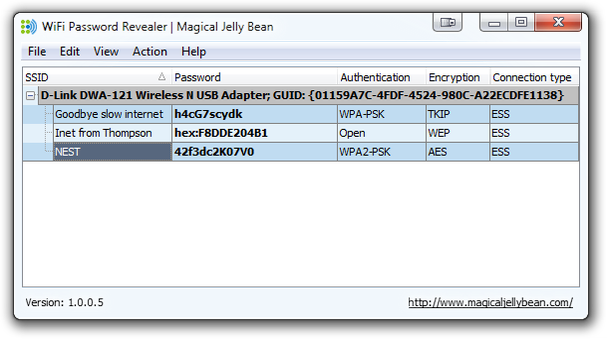
XP / VISTA / WIN 7 / WIN 8 皆适用的 Wifi 密码查看器
广告
本站里的文章大部分经过自行整理与测试
2013年8月19日星期一
2013年7月14日星期日
Notification Area Icons (右下角 Icons) 的清理
1. 用 regedit, 去以下地方
HKCU \Software \Classes \LocalSettings \Software \Microsoft \Windows \CurrentVersion \TrayNotify
将 IconStreams 和 PastIconsStream 给撤了就可以了
3. 按 Ctrl + Shit + Del 进入 WIndows Task Manager
4. 停止 explorer.exe (End process)
5. 在 File -> Run 输入 explorer.exe 重启
或
写个 TrayNotify.bat 运行以下代码
@echo off
@REG EXPORT "HKCU\Software\Classes\Local Settings\Software\Microsoft\Windows\CurrentVersion\TrayNotify" TrayNotify.reg
@REG DELETE "HKCU\Software\Classes\Local Settings\Software\Microsoft\Windows\CurrentVersion\TrayNotify" /v PastIconsStream /f
@REG DELETE "HKCU\Software\Classes\Local Settings\Software\Microsoft\Windows\CurrentVersion\TrayNotify" /v IconStreams /f
@taskkill /F /IM explorer.exe
@explorer.exe
2013年7月3日星期三
U盘的 write protection
在 Windows -> Run 输入 regedit,
到以下地方, 1 改为 0 后, restart 即可
HKEY_LOCAL_MACHINE\SYSTEM\CurrentControlSet\Control\StorageDevicePolicies\WriteProtect
如果找不到..
新建一个 txt file,复制以下内容:
Windows Registry Editor Version 5.00
[HKEY_LOCAL_MACHINE\SYSTEM\CurrentControlSet\Control\StorageDevicePolicies]
"WriteProtect"=dword:00000000
将档案从 usb.txt 改名为 usb.reg
然后在 windows, 按一按执行下这个档案即可
它会将以上的内容写入 registry 中
订阅:
博文 (Atom)